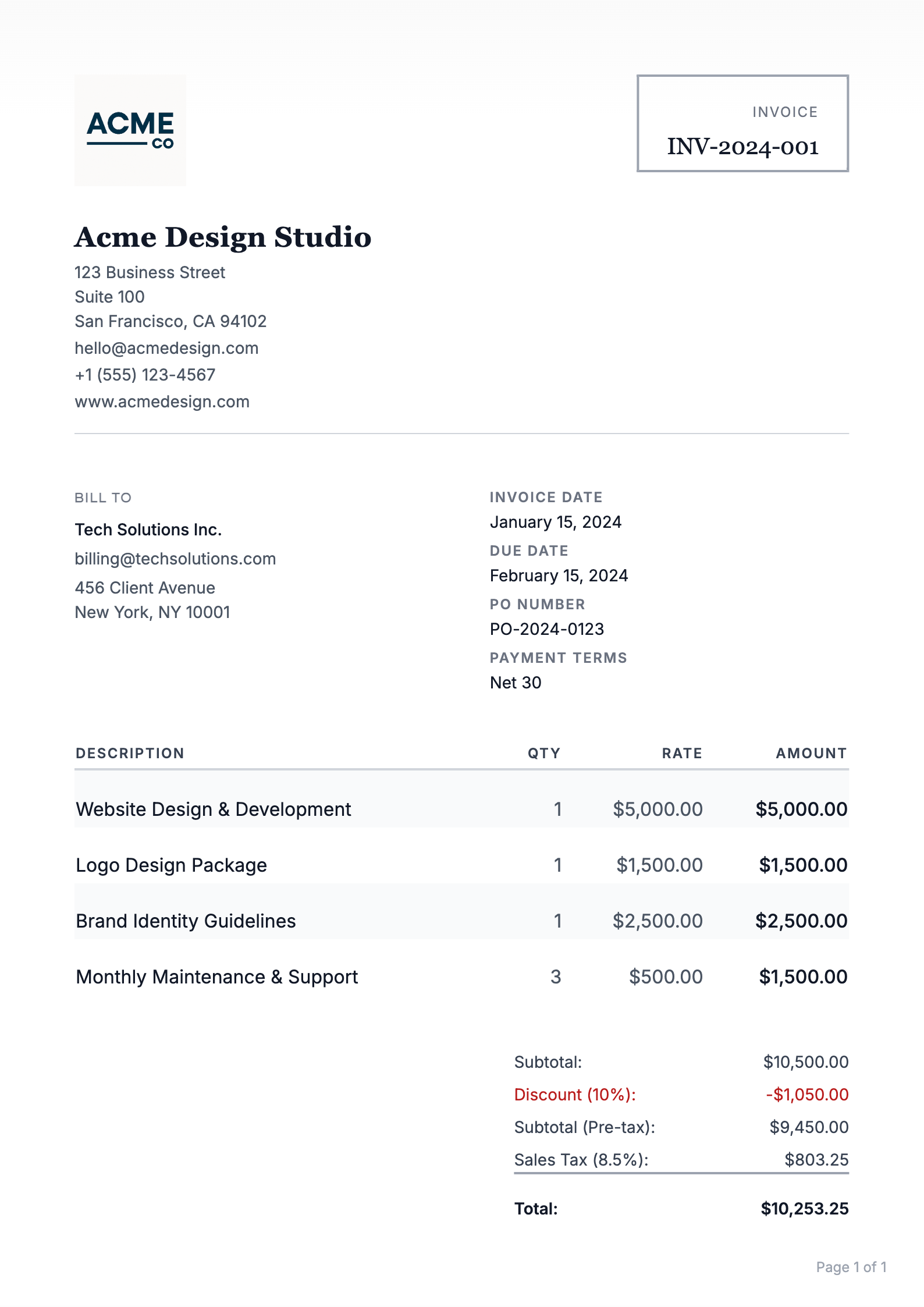
Quick answer
A website invoice itemizes design, development, content, hosting, and maintenance as separate line items tied to the agreed scope, and usually follows a deposit plus milestone schedule. Clear descriptions and a stated change-request policy prevent disputes.
What is a Web Development Invoice?
A web development invoice is a billing document that a freelance or agency web developer sends to a client after completing web work — whether that's a full site build, a single page, ongoing maintenance, or a redesign. A good web site invoice doesn't just request payment; it itemizes exactly what was delivered, when it's due, and what happens if it isn't paid.
Why Your Web Development Invoice Matters
Scope Protection
A detailed invoice reinforces what was agreed — making scope disputes much harder to start
Faster Payment
Clients pay faster when every line item is clear and there's nothing to question
Legal Record
Invoices are legal documents — essential for taxes, contracts, and dispute resolution
Recurring Revenue
Structured invoices make it easy to bill monthly for maintenance and retainer work
How to Create a Web Development Invoice: 8 Steps
Step 01: Add Your Business Details and the Client's Information
Every web development invoice starts with two sets of contact information: yours and your client's. This sounds obvious, but missing or incorrect details are one of the most common reasons invoices get held up in payment processing.
Your side should include your full name or business name, your address, email, phone number, and your tax ID or ABN if you're registered for tax purposes. The client side needs their company name, the name of the billing contact (not just "Accounts"), and their billing address.
- Your details: Full name or business name, address, email, phone, tax ID (if applicable)
- Client details: Company name, billing contact name, billing address
- Invoice number: Sequential (e.g., INV-2026-042) — never reuse numbers
- Invoice date: The date you're issuing it
- Due date: Explicit date, not just "Net 30" — e.g., "Due April 29, 2026"
Pro Tip
Find out who actually processes payments at your client's company before you send. Sending a web site invoice to the project manager instead of accounts payable is one of the easiest ways to add two weeks to your payment timeline.
Step 02: Describe Your Services in Specific, Itemized Terms
The line items on a web page invoice are where most freelancers make their biggest mistake: lumping everything under "website development — $4,500." That single line invites questions, disputes, and delayed payments. Clients need to see what they're paying for.
Break your work into logical service categories. For a typical site build, that might include discovery and planning, design (wireframes and mockups), front-end development, back-end or CMS setup, content migration, and testing. For a smaller engagement, it might be just two or three items.
- Design: Wireframes, mockups, responsive layouts — specify number of pages and revision rounds
- Development: Front-end build, CMS setup (WordPress, Webflow, custom), feature development
- Content: Copywriting, image sourcing, SEO setup — itemize separately if scoped separately
- Testing & QA: Cross-browser testing, performance optimization, accessibility checks
- Project management: Kick-off calls, client revisions, coordination — include if billable
Pro Tip
Use the same language your contract uses. If your contract says "three rounds of design revisions," your invoice should reference "design — 3 revision rounds included." This ties the invoice directly back to the agreed scope and shuts down disputes before they start.
Step 03: Break the Project into Billing Phases
For any project larger than a few hours of work, billing everything at the end is a mistake. Milestone-based invoicing protects you from clients who go quiet, run out of budget, or change direction halfway through — and it keeps your cash flow healthy throughout a long project.
The most common structure for a web development project is a three-phase payment schedule: a deposit upfront (typically 30–50% of the total), a mid-project payment at a defined milestone like design approval or staging launch, and a final payment on delivery. For larger projects, a four-payment split is common.
- Deposit invoice: Sent before work begins — 30–50% of the total project fee
- Milestone invoice: Sent at a defined point — design approval, staging site delivery, etc.
- Final invoice: Sent on go-live or project handoff — remaining balance due
Each phase invoice should clearly state which milestone it corresponds to, so there's no ambiguity about what's been delivered and what triggers the next payment.
Deposits Are Non-Negotiable
A deposit isn't a courtesy — it's how you protect yourself from doing weeks of work for a client who disappears. Most experienced web developers won't begin work without one. If a prospective client refuses a deposit entirely, that's a serious warning sign.
Step 04: Add Domain, Hosting, and Third-Party Costs as Separate Line Items
Web projects almost always involve costs beyond your time — domain registration, hosting setup, premium plugins, stock photography, font licenses, API subscriptions, or third-party integrations. These should never be buried in your hourly or project rate. List each one as its own line item with the actual cost.
This matters for two reasons. First, it keeps your rate transparent — clients can see exactly what your labor costs and what the tools cost. Second, it protects you from absorbing costs that should be passed through. A $300 plugin license isn't your overhead; it's a project expense.
- Domain registration: Note the registrar and renewal term (e.g., "domain — 1 year — $18")
- Hosting setup or first year: Specify the provider and plan if relevant
- Premium plugins or themes: List individually with the actual license cost
- Stock images or fonts: List the license cost per asset or as a batch
- Third-party APIs or services: Stripe, Mailchimp, Cloudinary setup fees, etc.
Pro Tip
Decide upfront whether third-party accounts go in your name or the client's. If you're registering a domain or hosting account on behalf of the client, make sure ownership transfer is part of the project scope — and invoice for the transfer of credentials as a line item if it takes meaningful time.
Step 05: Set Clear Payment Terms and a Late Fee Policy
Payment terms tell your client when the money is due and what happens if it isn't. For web development invoices, the most common terms are Net 15 (due 15 days from invoice date) or Net 30 — though many freelancers have moved to shorter terms or even due-on-receipt for deposits.
A late fee clause gives you leverage to follow up without it feeling purely personal. A standard late fee is 1.5% per month on the outstanding balance, applied after the due date. Whether you ever enforce it is up to you — but having it in writing changes client behavior.
- Due date: State as an explicit date, not just "Net 30" — "Due April 29, 2026" leaves no room for interpretation
- Accepted payment methods: Bank transfer, credit card, PayPal, Stripe — list what you accept
- Late fee: "A late fee of 1.5% per month applies to invoices not paid within 30 days"
- Kill fee: If the project is cancelled after work begins, specify what percentage of the total is owed
Shorter Terms Work in Your Favor
Net 30 became standard in an era of paper checks and postal mail. For digital work, Net 14 or Net 15 is perfectly reasonable. Many freelancers find that shorter terms combined with online payment options actually result in faster payment — because the path to paying is easier.
Step 06: Reference Your Contract or Project Scope Document
Your invoice isn't a contract, but it should point back to one. Including a line like "This invoice is issued per the project agreement dated [date]" or referencing a specific statement of work ties your billing to a signed document. If a dispute arises, that reference is what protects you.
If you're working without a formal contract (which you shouldn't be, but it happens), the invoice itself becomes the paper trail. In that case, include a brief project summary in the notes field: "This invoice covers the full design and development of the Acme Corp marketing site, as scoped in the proposal dated February 12, 2026."
Pro Tip
Add a "notes" section to your web site invoice where you can include brief delivery details — the URL of the staging or live site, login credentials handoff confirmation, or a note that the final files have been delivered. This creates a clean record of delivery tied to the invoice date.
Step 07: Handle Ongoing Maintenance and Retainer Work Separately
Many web development relationships don't end at launch. Ongoing maintenance — software updates, security patches, content changes, hosting management — is typically billed on a monthly retainer. This recurring work should be invoiced separately from the project invoice, on a predictable schedule.
A monthly web development invoice for retainer work should specify what's included: the number of hours, the types of tasks covered, and what falls outside the retainer scope. This prevents retainer clients from treating their monthly fee as unlimited access to your time.
- Retainer scope: "Up to 5 hours/month of CMS updates, plugin maintenance, and minor content edits"
- Overage rate: "Additional hours billed at $X/hr, invoiced separately at month end"
- Billing cycle: Invoice on the 1st of each month, due by the 15th
- Rollover policy: State whether unused hours roll over or expire
Recurring Invoices Save Time
If you have multiple maintenance clients, sending the same invoice manually every month gets old fast. Recurring invoice automation lets you set it up once and have invoices go out automatically — same amount, same day, every month.
Step 08: Send the Invoice at the Right Time
Timing matters. For milestone invoices, send immediately when the milestone is hit — not a few days later when you get around to it. Delay signals to the client that payment isn't urgent, and that impression sticks when their due date arrives.
For final invoices on a completed site, the right moment is at handoff — when you deliver the live site URL, the login credentials, and the final assets. Don't wait until after the client has had a few days to explore the site and accumulate a list of post-launch change requests. Invoice at handoff, and scope any additional requests as new work.
- Deposit invoice: Send before starting work, require payment before the first deliverable
- Milestone invoices: Send the same day you hit the milestone — not after the next check-in call
- Final invoice: Send at the moment of delivery, not after you've heard back from the client
- Maintenance invoices: Send on a fixed day each month so clients can plan for it
Pro Tip
Follow up on unpaid invoices before they're overdue. A brief, friendly message three to five days before the due date — "just a reminder, invoice #042 is due Friday" — prevents most late payments before they happen. Clients who are going to pay almost always pay faster after a prompt reminder.
Free to Start
Stop building invoices from scratch. Use a template.
Invoice Website has professional templates ready for web developers — add your line items and send.
Best Practices for Web Development Invoices
Always Collect a Deposit Before Starting
A deposit isn't just about cash flow — it's a commitment signal. A client who pays a deposit has skin in the game. You'll find that deposited clients respond faster, make decisions more decisively, and are less likely to ghost mid-project. For fixed-price projects, 40–50% upfront is standard. For larger or longer engagements, 30% is reasonable. For very small projects (under $500), consider requiring full payment upfront.
Separate Your Rate From Pass-Through Costs
When you bundle hosting costs, plugin licenses, and domain fees into your project rate, clients have no way to verify what they're actually paying for — and that erodes trust over time. List every third-party cost separately and at cost (no markup unless your contract specifies one). Clients appreciate the transparency, and it makes your labor rate look cleaner by comparison.
Write Line Items Your Client Will Recognize
Avoid developer jargon in your invoice descriptions. "React component architecture" means nothing to most clients. "Front-end development — interactive features and mobile-responsive layout" says the same thing in language they understand. The goal is for a client to read your web development invoice and immediately think, "yes, that's what we talked about" — not to have to call you to decode it.
Include a Notes Field for Delivery Confirmation
A brief note at the bottom of your invoice — "Live site delivered at [URL] on [date]. Login credentials sent separately via [method]." — creates a timestamped delivery record tied to the invoice. If a payment dispute ever comes up, you have documentation that what was invoiced was actually delivered. It takes 20 seconds and protects you.
Set Revision Limits in Your Invoice Notes
If your project rate includes a defined number of revision rounds, reference it on the invoice. "Design fee includes two rounds of revisions per the project agreement. Additional revisions billed at $X/hr." This isn't adversarial — it's clarity. Clients who understand the scope from the invoice are far less likely to push for unlimited changes after the fact.
Common Web Development Invoice Mistakes to Avoid
Invoicing Mistakes Web Developers Make
- Vague line items: "Website development — $5,000" tells the client nothing and invites every question. Break your work into at least three to five specific line items. If they can't see what they're paying for, they'll hesitate to pay for it.
- Forgetting third-party costs: Hosting, domains, plugins, fonts, and stock images should appear as separate line items at their actual cost. Absorbing these into your rate or forgetting to bill for them at all is money left on the table — or money you're silently paying for your client.
- No deposit: Starting work without a deposit means you're financing your client's project. One client who disappears, changes their mind, or runs out of money after four weeks of your work is all it takes to understand why deposits are standard. They should be non-negotiable.
- Sending the final invoice after launch feedback: Once a site is live, clients start noticing things they want changed. If you haven't sent the final invoice yet, those requests become "part of the project." Invoice at handoff — before the feedback window opens.
- No kill fee clause: Projects get cancelled. If a client cancels a $6,000 project after you've done three weeks of work, a kill fee clause ensures you're compensated for the time already spent. Without one, you have little legal standing to collect beyond whatever was already deposited.
- Ignoring overdue invoices: Many freelancers feel uncomfortable following up on unpaid invoices and let them age. But the longer an invoice goes unpaid, the harder it becomes to collect. Follow up within two or three days of the due date, not two weeks after.
Using Online Tools for Web Development Invoicing
Why a Dedicated Invoice Tool Beats a Spreadsheet
Building your web page invoice in a spreadsheet or Word doc means recreating the same structure from scratch every time, manually tracking what's been sent and paid, and chasing down your own records when a client asks for a copy six months later. A dedicated invoicing tool handles all of that automatically.
- Professional appearance: Pre-designed templates that look polished without any design work on your part
- Automatic numbering: Sequential invoice numbers generated for you — no risk of duplicates or gaps
- Payment tracking: See at a glance which invoices are paid, outstanding, or overdue
- Recurring billing: Set up monthly maintenance retainer invoices once and automate them
- PDF export: One click to a clean, client-ready PDF you can attach to any email
Conclusion: Get Paid for Your Web Work
Ready to Invoice Your Next Project?
A solid web development invoice does three things: it documents exactly what was delivered, it sets clear expectations for when you get paid, and it protects your scope so the project doesn't quietly expand after the invoice is sent. The detail you put into it is a direct reflection of the professionalism you bring to the work itself.
Start with a deposit before touching the project, bill in milestones for anything that takes more than a few days, itemize every cost separately, and send your final invoice at handoff — not after. Those four habits will eliminate most of the payment friction freelance web developers deal with.
Ready to invoice your next client? Sign up for Invoice Website and create a professional web development invoice in minutes — with templates, automatic numbering, and clean PDF export built in.
Frequently Asked Questions
How should web developers structure invoices?
Bill a deposit before starting, then invoice at milestones such as design approval, development complete, and launch. List each phase as its own line item with the agreed price.
Should hosting and maintenance be on the same invoice as the build?
Keep them separate. The build is a one-time project invoice, while hosting and maintenance are recurring charges that work best on their own monthly or annual invoices.
How do I invoice for extra website changes?
Define what is included in the project, then bill additional requests hourly or as a fixed change order. Reference the original project and describe the specific change on the invoice.
What payment terms are typical for website projects?
A 30 to 50 percent deposit, milestone payments due on receipt or Net 15, and the final payment before the site goes live is the most common structure.